

Elance Series: Part 3
Searching for the Perfect Opportunities
Arguably the most compelling and frustrating part of using Elance is the mass of jobs to choose from. If you go in blindly, you could get lost in all the options and give up without applying for a single one. Careful, calculated searches will lead you to perfect jobs for you.
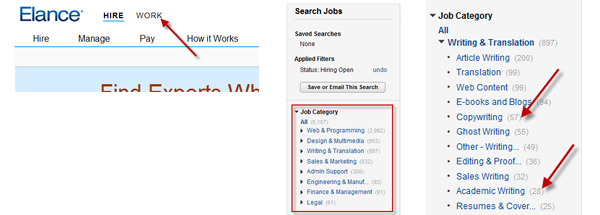
A simple search is pretty easy. Click on "Work," then "Search jobs." Under the list of job types, choose your genre. You can choose writing, designing, engineering, finance or other choices. To further refine your search, you can select a more precise listing. For instance, you can choose copy writing or academic writing under the writing category. You can also search by how big the budget is, how long before the jobs expire and when they were posted.
If you are looking for a specific job or field, you can put a keyword or words into the search field. As someone who has written a lot about families and cooking, I might search for "food" or "kids."
Once you limit the jobs to your preferences, you can scroll through the options. Click on the fields above the grid to order the jobs by the date they were posted or the date they expire. If you find a search matrix that limits the choices to your preferred jobs, you can save the search selection so it is available later or have the new jobs in those categories sent to your email inbox on a regular basis.
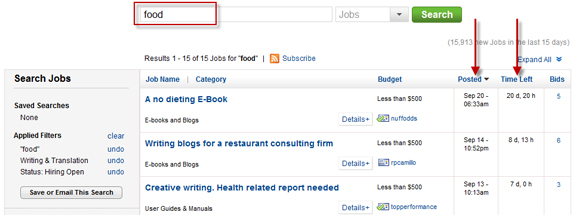
As you start searching through jobs, you can click the plus sign underneath to get a peek or click on the job to get a complete look at the description. You can also scroll over the number of bids on the far right to see the highest, lowest and average bid.
If you see a job in the list that entices you, click on Details and then Forward, Watch List or Bid. Forward gives you the option to email the details to yourself or someone you know. Watch List saves the job to an internal list that you can check later. I suggest looking through all the jobs, saving the ones you like and bidding on them at the end.
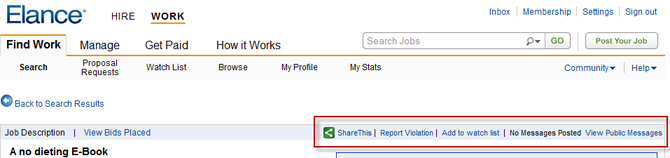
When you are ready to bid, click on the job or on the Watch List near the top of your screen, followed by the job of your choice. On the left hand of the screen, you will see a message from the poster, budget details, time frame and other stipulations. On the top of the right side of the screen, you can send a question for clarification to the poster.
Under the message box is the place you can send a bid. The box is the place for you to put a short cover letter. Give the poster your proposal for what you can deliver, how much time it will take you and how much you will charge.
You may find searching to be frustrating in the beginning, but give it time. New jobs are posted every day so give yourself ten minutes each morning to take a look. Don't be disappointed if your dream job isn't listed immediately. The spectrum of jobs that show up every day is broad. Just save your connects and take another look tomorrow.
Tiffany Silverberg is a Navy wife and independent writer. Tired of rebuilding a career every three years, she set up a home office and started writing. Four years later, she has found a career writing for small businesses and nonprofit organizations. With experience ranging from grants to blogs, online and offline pieces, Tiffany Silverberg has the flexibility and passion necessary to be a successful military spouse freelancer.
www.tiffanysilverberg.com
Disclaimer: featuring Elance does not imply endorsement by the NSMN. Elance is one of several online options for freelancers and consultants. It is simply the preferred provider of our writer. We encourage you to research the best solution for your needs.